PANDA

Panda vs DilutionTracker: an honest comparison for small-cap day traders (2026)

Updated August 2026

Written by Panda Trading Solutions. We built one of the products compared here — so every claim below is checkable, and we say plainly where DilutionTracker wins.

DilutionTracker and Panda solve the same problem at different moments of the trading day. One is a research archive you open in a browser; the other is a Windows layer that sits on top of your trading screen and follows your DAS montage. They overlap on the data — dilution risk, real float, shelf capacity, ATM programs, warrants — and diverge on almost everything else: delivery, price, coverage depth and what happens at 9:31 a.m.

The 30-second answer

DilutionTracker is the deeper and cheaper research archive: it has a free tier, runs in any browser on any operating system, and its historical filing coverage and OTC depth are the best in the category. Panda is a Windows desktop layer that puts dilution risk, real float, shelf capacity, ATM programs and warrants on top of your DAS montage — re-resolving automatically every time the montage symbol changes — next to a scanner that remembers the entire session. Choose DilutionTracker if your work happens in a browser before and after the bell; choose Panda if the read has to be on screen while the move is happening, and know that plenty of small-cap traders pay for both.

What DilutionTracker does well

DilutionTracker is the reference archive for small-cap share structure, and nothing on this page disputes that. Its depth comes from years of parsed filings: offering history per ticker, S-1 and S-3 registrations, 424B5 pricings, ATM programs and how much of each has been used, warrant tranches and their strikes, cash-runway estimates, institutional ownership, and screeners built on top of that same database. Coverage goes well past listed names into OTC tickers, which matters if your universe includes sub-penny shells and pink-sheet reverse mergers.

Three more advantages worth naming out loud. It is web-based, so it runs on macOS, Linux, ChromeOS or a phone browser — Panda does not. It has a free forever tier (Casual), so a trader can start at zero. And it is an established brand with a knowledge base that taught a large part of the retail small-cap community what an ATM offering even is. None of that is marketing on our side; it is the actual state of the category.

Where Panda is different: the data lives on your DAS montage

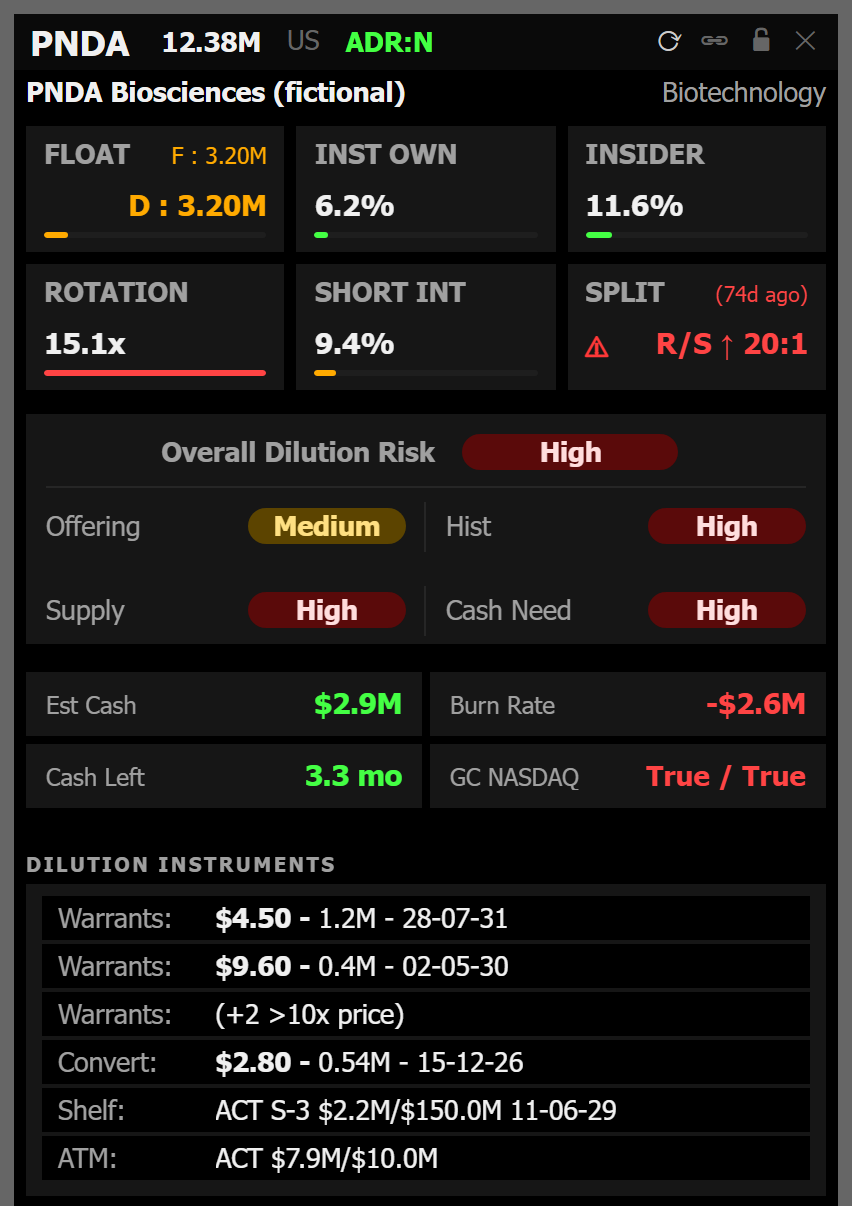
The difference is not the existence of the data — it is where the data is at the moment you need it. Panda Desk is an always-on-top window that you link once to a DAS Trader Pro montage. From then on, every symbol change in that montage re-resolves the overlay in the background: the dilution risk, real float, shelf capacity, ATM programs, warrants and the news catalyst for the new ticker are already rendered by the time the chart finishes loading. No browser tab, no retyping, no alt-tab. TradingView is supported the same way, live today.

Two honest boundaries. First, the app is a read layer: it never types into DAS, never moves your mouse and never places an order — Panda is not a broker and does not execute anything. Second, the montage link is the reason to prefer Panda, and it only pays off if you trade on Windows with DAS Trader Pro or TradingView in front of you. If you do not, you are paying for a delivery advantage you cannot use.

Side-by-side

CapabilityPandaDilutionTracker
DeliveryWindows desktop, always-on-top overlayWeb app in any browser
DAS montage link (symbol follows)Yes — DAS Trader Pro and TradingViewNo
Full-session scanner with halts and SSRYes — accumulates from premarketNo — not a real-time momentum scanner
Dilution, real float, shelf, ATM, warrantsYesYes
Historical filing archive depthFocused on the current setupDeeper — their strength
OTC coverageFocus is NASDAQ/NYSE-listed small capsDeeper — their strength
Cash runway and institutional ownershipNot the focusYes — their strength
Free tierNoYes — Casual, free forever
Trial7 days, card required (both tiers)Free tier + 7-day Premium trial
macOS, Linux, mobileNo — Windows 10/11 onlyYes, via browser — their strength
PriceUS$89.90/mo Starter · US$189.90/mo ProUS$74/mo monthly · US$49/mo annual (US$588/yr)
AI written read of the setupYes — Pro, in EN/PT/ES, with levels on the chartNo
Data sourceSEC EDGAR filings + real-time US market dataTheir own filings database and research

Real float, shelf capacity and warrants

Both products carry the numbers that decide a low-float trade; the difference is when you see them. Panda parses SEC EDGAR and shows the current read — real float rather than shares outstanding, remaining shelf capacity, whether an ATM program is live and how much room it has, warrant overhang and the catalyst attached to the move — as a panel pinned beside your montage, refreshed on every symbol change. DilutionTracker shows the same categories with far more history behind them: prior offerings, filing-by-filing timelines, and the research notes that explain what a company has done before.

Put plainly: if the question is “what has this company done over three years?”, the archive wins. If the question is “can this move absorb what is filed right now, and I have eleven seconds to decide”, the overlay wins. Those are different questions and most active traders ask both, just at different hours.

Session memory: what happens to the 7 a.m. runner by noon

Panda Scanner is a full-session accumulator, not a rolling snapshot. Every gapper, spiker, halt, SSR flag and MOMO alert since premarket stays on the board with its session statistics, so a name that ran at 7 a.m. is still one click away at noon — and clicking the row loads the ticker into every linked window, DAS montage included. Premarket runs through after-hours with session-aware columns, so premarket levels and session-high floors carry through the day.

DilutionTracker does not compete here, and does not claim to: it is a filings and research platform, not a real-time momentum board. If a scanner is what you are actually shopping for, the honest comparison is against scanner vendors — Panda vs Trade Ideas is the right page for that.

Pricing

DilutionTracker is cheaper at every level, and there is no way to spin that. It has a free forever tier (Casual) and a Premium plan at US$74/month month-to-month or US$49/month billed annually (US$588 per year, roughly a third off), with a 7-day trial. Panda has no free tier: Starter is US$89.90/month and Pro is US$189.90/month, both with a 7-day free trial that requires a card and a 7-day no-questions refund on every charge — about two weeks of risk-free evaluation in practice.

Bottom line on money: Panda Starter costs about US$16 more per month than DilutionTracker Premium billed monthly, and about US$41 more than the annual rate. What that difference buys is a full-session scanner and a montage-linked overlay, not a deeper archive. If the archive is what you want, you would be paying more for less.

Who should stay on DilutionTracker

Several kinds of traders are better served by DilutionTracker, and we would rather say so than sell you the wrong tool:

  • You trade on macOS, Linux or a Chromebook. Panda is Windows 10/11 only. This one decision ends the comparison.
  • OTC is the core of your universe. Their coverage of OTC tickers and shell history goes deeper than ours, which is built around NASDAQ- and NYSE-listed small caps.
  • You need budget, or free. Casual costs nothing and Premium is cheaper. Panda has no free plan.
  • Your work is research, not execution. If you build watchlists and dilution theses at night and swing them for days, the archive is the product you actually use; the montage overlay would sit idle.
  • You do not use DAS Trader Pro or TradingView. The flagship integration is the reason to pay Panda more. Without it, the case shrinks to the scanner.
  • You want cash-runway and institutional-ownership screens. That is their territory and it is well built.

Who Panda is for

Panda is for the intraday small-cap trader on Windows whose losses come from looking away. Concretely:

  • You trade momentum on DAS Trader Pro (or TradingView) and switch tickers dozens of times a session, and every switch currently means a browser tab.
  • You have been caught by a shelf, an active ATM or warrant overhang after entering, because the read arrived late.
  • You lose names: the 7 a.m. runner disappears from a rolling scanner by the time it sets up again at 11.
  • You want a written read of the structure — what the setup is and where the levels are, in English, Portuguese or Spanish — which is what AI Insight does on the Pro tier. It reads structure and writes; it does not predict prices and does not generate buy/sell signals.

More detail on requirements, plans and what the app does not do is in the Panda FAQ.

How to run both

This is the setup we see most often, and it is not a compromise — the two products sit in different hours of the day. Use DilutionTracker after the close and before the open: pull the offering history of the names on your watchlist, read the research notes, check which shells have been serial issuers, and build the thesis where depth and time both exist. Use Panda during the session: the scanner carries the movers from premarket forward, and the overlay keeps the structure read on screen, switching with your montage, so the decision at 9:31 does not require a browser.

The combined cost is US$138.90 per month with DilutionTracker on annual billing, or US$163.90 month-to-month, against Panda Starter. For a trader whose size makes one avoided dilution trap worth more than that, the stack is the answer; for a trader still building, start with the one that matches the hour of the day you actually work in.

Frequently asked questions

Is Panda a DilutionTracker replacement?

Not exactly. DilutionTracker is a research archive you open in a browser; Panda is an execution-time layer that pins the same class of data — dilution risk, real float, shelf capacity, ATM programs, warrants — on top of your trading screen and switches it with your DAS montage. If your work is deep pre-session research and filing history, DilutionTracker is the better tool. If the read has to be on screen while the move happens, Panda is. Plenty of small-cap traders pay for both.

Do I need DAS Trader Pro to use Panda?

No. Panda Desk, Panda Scanner and the charts run standalone on any Windows 10 or 11 machine. The montage link is the flagship integration — DAS Trader Pro and TradingView are live today — and it is what makes the overlay follow your symbol without retyping. Without it you still get the dilution read, the scanner and the charts; you just switch tickers yourself.

Does Panda cover OTC stocks the way DilutionTracker does?

Not at the same depth, and we will not pretend otherwise. Panda is built around NASDAQ- and NYSE-listed small caps in real time — that is where the scanner, the montage link and the live dilution read are aimed. DilutionTracker’s coverage of OTC tickers and its historical filing archive go further, and if OTC is the core of your trading, that is a real reason to stay with them.

Which is cheaper, Panda or DilutionTracker?

DilutionTracker, at every level. It has a free forever tier (Casual), and Premium is US$74/month month-to-month or US$49/month billed annually (US$588/year), with a 7-day trial. Panda is US$89.90/month for Starter and US$189.90/month for Pro, with no free tier. If price is the deciding factor, DilutionTracker wins the comparison outright.

Where does Panda’s data come from?

Real-time US market data — premarket, regular hours and after-hours — plus dilution and filings intelligence built from SEC EDGAR. The share-structure layer (real float, shelf capacity, ATM programs, warrants, offering history) is parsed from the filings themselves, and the quote and scanner layer comes from live US equities data, which is why the overlay can refresh the read the second the montage symbol changes.

Is there a free version of Panda?

No. Panda has a 7-day free trial on both tiers, with a card on file, and a 7-day no-questions refund on every charge — in practice about two weeks to evaluate it at no risk. There is no permanently free plan. DilutionTracker does have one (Casual, free forever), so if a free tool is what you need today, that is the honest answer.

Does Panda run on Mac?

No. Panda is a Windows 10/11 desktop application installed from the Microsoft Store — it pins itself on top of DAS Trader Pro, which is itself a Windows platform. DilutionTracker is web-based and runs in any browser on macOS, Linux, ChromeOS or a phone. If you do not trade on Windows, that difference decides the comparison before anything else does.

Not investment advice. Panda Trading Solutions is not a broker, does not give financial advice and never executes orders. DilutionTracker is a product of its respective owner and is not affiliated with Panda Trading Solutions. Prices checked in August 2026 on each vendor’s public pricing page and may change.