Trade Ideas alternative for small-cap day traders: Panda vs Trade Ideas (2026)
Updated August 2026
Written by Panda Trading Solutions. We built one of the products compared here — so every claim below is checkable, and we say plainly where Trade Ideas wins.
Trade Ideas and Panda get compared because both put a list of moving stocks on your screen — but they answer opposite halves of the same question. Trade Ideas is built to tell you what to look at. Panda is built to tell you what the thing you are looking at actually is: real float, shelf capacity, ATM programs, warrants and the catalyst, pinned next to your DAS montage. This page compares them the way a small-cap day trader would — with prices, with the gaps named on both sides, and with a section on when you should stay exactly where you are.
The 30-second answer
Trade Ideas is the stronger product if you want signals handed to you: Holly generates trade ideas from backtested strategies overnight, and nothing in Panda replaces that. Panda is the stronger product if you trade low-float small caps, because it carries the one data layer Trade Ideas does not have at all — share structure from SEC filings — and it puts that read on top of your DAS montage instead of in another tab. The honest split: Trade Ideas tells you what is moving, Panda tells you what the thing that is moving can absorb.
Price makes the comparison sharper than it looks. Panda Starter is $89.90/mo against Trade Ideas Premium — the tier with Holly — at $254/mo billed monthly. That is not a small difference, and it is the reason “Trade Ideas alternative” is a query in the first place. But cheaper is not the argument we want to win on, so the rest of this page is about what each tool actually does.
What Trade Ideas does well
Trade Ideas’ real differentiator is that it generates the signal for you — you do not have to know what to scan for. That sounds like marketing until you have spent a month tuning filters and getting nothing. Holly, the AI engine on the Premium tier, runs a library of strategies against the previous session overnight, keeps the ones that held up, and hands you entries the next morning. Whatever you think of trading someone else’s rules, no scanner-building workflow reproduces it, and it is why Trade Ideas has kept the category for over a decade.
Beyond Holly, the things Trade Ideas has that Panda does not:
- Backtesting. You can validate a rule set against history inside the product. Panda has no backtester at all.
- Simulated trading. Paper trading is native on both tiers, so you can run a strategy without money on it.
- Order entry. Through connected brokers (Brokerage Plus) you can click a signal and get filled from the same window. Panda is not a broker and never executes orders.
- The alert-window library. Years of configurable windows, presets, Stock Races and layout options — a deeper configuration surface than anything Panda ships.
- Smart Risk Levels on Premium, plus real-time data, 10 charts and saved layouts on Basic.
- It runs anywhere. Trade Ideas is browser-accessible, so macOS and Linux traders are covered. Panda is Windows 10/11 only.
If a comparison page does not tell you those six things, it is selling you something. That list is the reason plenty of traders should not switch, and we come back to it below.
Where Trade Ideas leaves small-cap traders exposed
Trade Ideas has no filings layer — no real float, no shelf capacity, no ATM program, no warrant overhang. For most of the market that is fine. For a $2 stock up 180% on a press release, it is the whole trade: the data that decides whether the move survives the afternoon is not price or volume, it is how many shares the company is allowed to sell into it, and how fast.
The specific failure mode is familiar to anyone who trades this niche. A name gaps on news, the signal fires, the setup looks textbook — and the company has an effective S-3 with an at-the-market program running underneath it. The offering prints, the tape turns into a wall, and the chart never told you. A signal engine is structurally blind to that, because the information lives in EDGAR, not in the quote feed. It is also why traders in this niche end up subscribing to a research tool like DilutionTracker ($74/mo, or $49/mo billed annually) alongside their scanner — the gap is real enough that a whole product category exists to fill it.
Two smaller gaps matter to small-cap traders specifically. Trade Ideas is tuned as a broad-market engine, so the low-float, low-price, high-volatility corner it is weakest in is exactly the corner some people trade exclusively. And a signal that fires at 7:12 AM has to be acted on or lost — the window scrolls, the name rolls off, and by midday reconstructing what happened means going back to a chart instead of a board.
Panda’s angle: the scanner remembers the session, the overlay follows your montage
Panda does two things Trade Ideas does not: it keeps the entire session on the board, and it pins the filings read to the ticker in your DAS montage. Neither is a signal. Both are about not losing information you already had.
Panda Scanner is a full-session accumulator, not a rolling snapshot. Every gapper, spiker, halt, SSR flag and MOMO alert since premarket stays on the board with its session statistics, so the 7 AM runner is still one click away at noon — even after it cooled off, even after it stopped qualifying for any filter. That is a deliberate design choice: most scanners are windows onto right now, and small-cap traders keep needing the name that ran three hours ago. Click a row and the ticker loads in every linked window, DAS montage included.
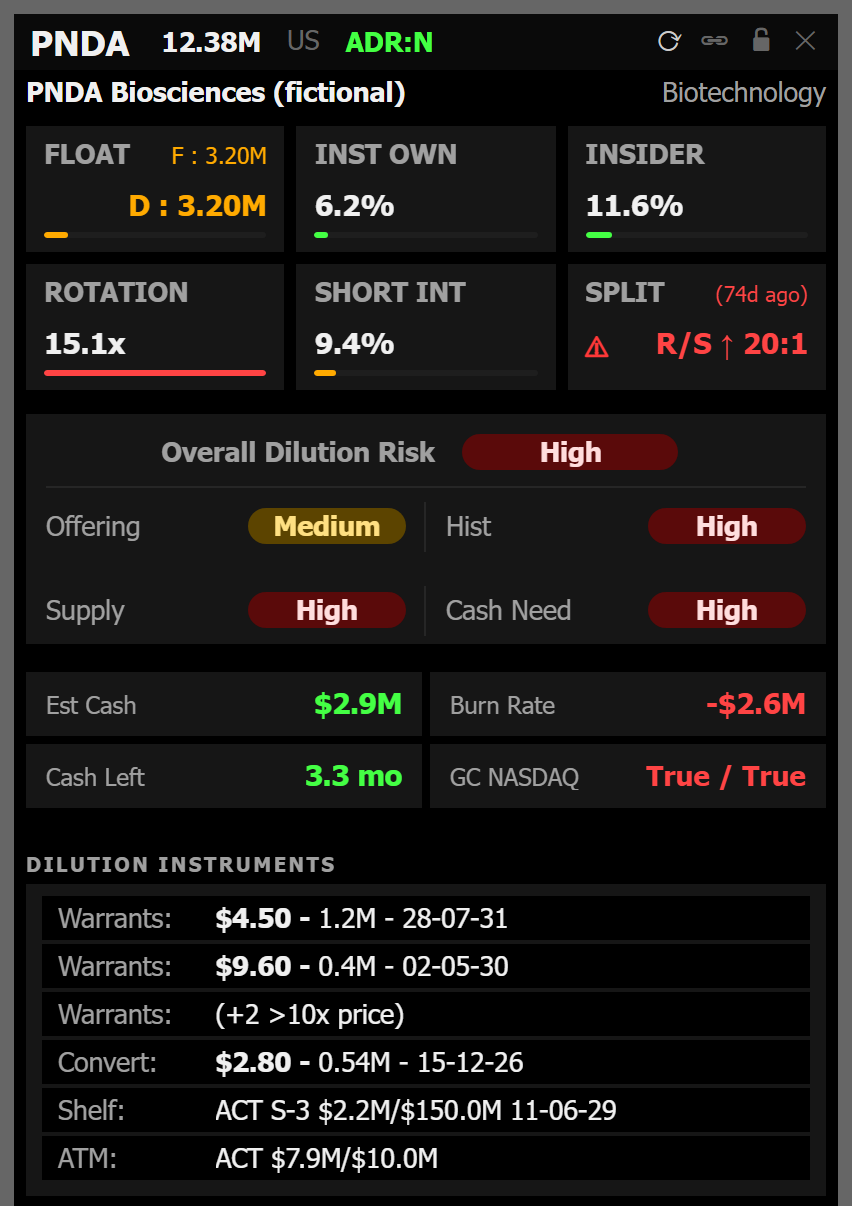
Panda Desk is the always-on-top read. Link the overlay to a montage window once; from then on, every symbol change in that montage re-resolves the overlay in the background — dilution risk, real float, shelf, ATM, warrants and the news catalyst, built from SEC EDGAR filings. By the time the chart finishes loading, the risk read is already there. No retyping, no alt-tab, no browser tab you forgot to refresh. The app never types into DAS, never moves your mouse and never places an order; it reads the symbol and shows data next to it.
On Pro, AI Insight writes the read: what the setup is, what the filings imply, and levels plotted on the chart, in English, Portuguese or Spanish. It is worth stating what that is not — it is not Holly, it does not generate signals, it does not rank candidates and it does not predict prices. It explains the ticker in front of you.
Halts, SSR and MOMO
Halts and short-sale restriction are first-class data in Panda, and they are where a small-cap board earns its keep. A low-float name that halted twice on the way up and is now trading under SSR is a different instrument than the same chart without those flags, and both facts are easy to miss if your scanner refreshes them away.
The Scanner carries halt state and SSR through the whole session and keeps them on the row, so the history of the name is visible at a glance rather than reconstructed. MOMO is the alert stream that sits on top: sharp moves, halts and resumptions surface in real time, in premarket, regular hours and after-hours — alerts-only by design, so the board itself stays the accumulator. Premarket coverage is not an afterthought here; accumulation starts before the open, which is when most of these names make their decision.
Side-by-side
Three tools, three different jobs. Prices are monthly-billing figures checked in August 2026; annual equivalents are noted in the Pricing section below.
| Platform | Price/mo | Delivery | Signal style | Dilution & float data | DAS montage link | Best for |
|---|---|---|---|---|---|---|
| Panda | $89.90 Starter · $189.90 Pro | Windows desktop, always-on-top overlay + scanner | No signal generation — full-session mover board; written AI read on Pro | Yes — real float, shelf, ATM, warrants, filings (SEC EDGAR) | Yes | Low-float small-cap day traders who need share structure at execution speed |
| Trade Ideas | $127 Basic · $254 Premium | Web and desktop, any OS | Holly AI generated signals, configurable alert windows, backtesting | No | No | Traders who want signals handed to them, validated against history, with order entry |
| DilutionTracker | $74 Premium | Web browser | None — a research archive, not a signal or scanning tool | Yes — the deepest filing archive of the three | No | Post-market research on offerings, share counts and financing history |
Pricing, checked August 2026
The cheapest way into Holly is $178/mo on annual billing; the cheapest way into Panda is $89.90/mo with no annual commitment. Here are the actual numbers, because comparison pages in this category are full of stale ones.
- Trade Ideas Basic — $127/mo billed monthly, or $89/mo billed annually ($1,068/year). Includes real-time data, 10 charts, layouts, paper trading and in-app trading. Holly is not in this tier.
- Trade Ideas Premium — $254/mo billed monthly, or $178/mo billed annually ($2,136/year). Adds Holly (1st Gen AI Signals), backtesting and Smart Risk Levels.
- Panda Starter — $89.90/mo. The whole desk: Scanner, Desk overlay, Live Events, charts and modules.
- Panda Pro — $189.90/mo. Adds AI Insight in EN, PT and ES, plus the AI levels plotted on the chart.
Panda has a 7-day free trial with a card on file on both tiers and a 7-day no-questions refund on every charge, which in practice is two weeks to decide. There is no free tier. It installs from the Microsoft Store and runs on Windows 10 or 11 — if you are on macOS, this comparison ends here and Trade Ideas is your answer.
Who should stay on Trade Ideas
Most Trade Ideas subscribers should keep it, and several kinds of trader should not even trial Panda. Being specific about that is more useful than a feature grid:
- You rely on Holly. If your process is “open the Holly window and work the list”, nothing in Panda replaces it. We do not generate signals, and pretending otherwise would waste your money.
- You backtest. Panda has no backtester. If validating rules against history is how you build conviction, that is a hard stop.
- You want to execute from the scanner. Brokerage Plus gives you order entry in the same window. Panda never places orders, by design and by policy.
- You are not on Windows. Panda is a Windows 10/11 desktop app; there is no macOS build and no browser version.
- You trade large caps or futures-adjacent flow. Share structure and dilution barely move the needle on liquid names — you would be paying for a data layer you never read.
- You need the deepest configuration surface. The Trade Ideas alert-window library is larger than what Panda exposes, and that is unlikely to change soon.
Who Panda is for
Panda is for the trader whose losses come from share structure, not from stock selection. Concretely: you trade sub-$10, low-float US small caps; you already know how to find movers; and the trades that hurt are the ones where an offering, an ATM or a warrant exercise showed up after you were in.
It is also for the DAS Trader Pro user specifically. If your day is a montage, a chart and three browser tabs, the montage link is the whole pitch: the read follows the symbol you are already trading, so the alt-tab disappears. And it is for anyone who has lost the 7 AM runner by 11 AM and had to reconstruct it — the Scanner exists because that keeps happening. More detail on requirements and scope is in the Panda FAQ.
Switching — or running both
The realistic recommendation for a lot of people is not switching at all: it is Trade Ideas Basic plus Panda, instead of Trade Ideas Premium alone. Basic at $127/mo gives you the alert windows and real-time data; Panda Starter at $89.90/mo gives you the session board and the structure read. That stack costs less per month than Premium and covers both halves of the question. If Holly is what you actually use, keep Premium and add Panda only if the dilution axis is costing you real money — it should pay for itself in avoided trades or not at all.
If you are switching outright, the practical order is: run the 7-day trial during a live session, not on a weekend; link the Desk overlay to your DAS montage on day one so you feel the difference on symbol changes; and judge the Scanner at 11 AM, not at 9:31 — the whole point is what is still on the board hours after the move. Keep your Trade Ideas subscription running through the trial. Comparing two tools from memory is how people make expensive decisions.
Frequently asked questions
Is Panda cheaper than Trade Ideas?
Yes. Panda Starter is $89.90/mo and Pro is $189.90/mo. Trade Ideas Basic is $127/mo billed monthly ($89/mo billed annually, $1,068/year) and Premium — the tier that includes Holly AI — is $254/mo billed monthly ($178/mo billed annually, $2,136/year). Compared like for like on monthly billing, Panda Starter is roughly a third of Trade Ideas Premium.
Does Panda have anything like Holly?
No, and it is worth being exact about it. Holly is a signal generator: it runs backtested strategies overnight and hands you entries the next session. Panda’s AI Insight (Pro) is a written read of the ticker you are already looking at — what the setup is, what the filings say, and levels plotted on the chart. It never says buy or sell, never ranks a watchlist for you and does not generate signals. Different job.
Can Panda place orders?
No. Panda Trading Solutions is not a broker, never executes orders and never types into your trading platform — it reads the symbol from your montage and shows data next to it. Trade Ideas does offer order entry through connected brokers (Brokerage Plus), so if you want to click a signal and get filled from the same window, that is a genuine Trade Ideas advantage.
Does Panda have backtesting?
No. There is no strategy backtester and no simulated-trading mode in Panda. Trade Ideas has both natively, and its backtesting is part of why Holly’s output is trusted by the people who use it. If validating a rule set against history is central to how you work, Trade Ideas wins that outright.
Which brokers work with Panda’s DAS link?
Any DAS-based broker: CenterPoint, Cobra, SpeedTrader, SageTrader, Ocean One and others — plus TradingView, live today. You link the overlay to a montage window once and every symbol change from then on re-resolves the read in the background. Panda never opens, closes or controls the platform.
Can I use both?
Yes, and it is a common stack. Trade Ideas generates the candidate — Holly or an alert window flags a name — and Panda answers the question that comes next: what is the real float, is there a loaded shelf, is there an ATM running, are there warrants in the money. Signal from one, structure from the other; they do not overlap.
Not investment advice. Panda Trading Solutions is not a broker, does not give financial advice and never executes orders — it is a data and visualization layer. Trade Ideas is a trademark of its respective owner and is not affiliated with Panda Trading Solutions. Prices for both products checked August 2026 on each vendor’s public pricing page and subject to change.